Field notes
Google started an experiment on one of our sites
At 8:23 this morning, Google started an experiment on a procurement-data site in our network. We did not create it, we were not asked first, and it was already running when we opened the dashboard. We are letting it run, on purpose, and this note is the day-one record: what appeared, why this one gets a pass, and the open loop we will close when the data lands.
If "Google can start experiments on my account" is news to you, the mechanics and every control are in the explainer. The data behind our call is at the receipts.
By Mario Bailey · Published
The row
What appeared
The morning check of the account found a row on the Experiments page that we did not put there. Name: "Anchor ads". Type: Auto ads. Created by Google: yes. Started: 8:23 AM. Status: Running. No email had announced it; the row was simply there, already collecting data on the site's live traffic.
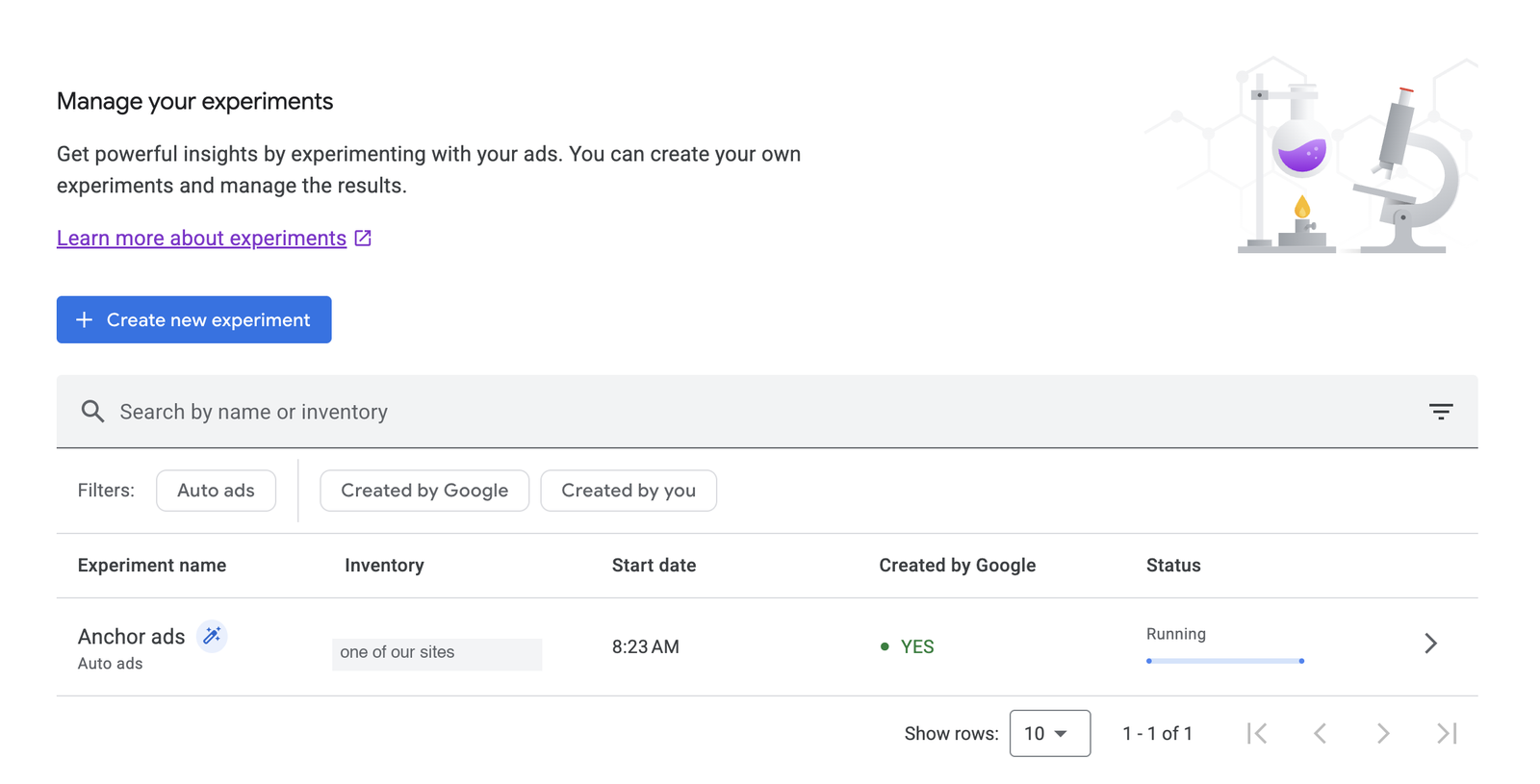
This is not a malfunction or a flag on the account. Google's docs call it Auto optimize: Google runs experiments on your Auto ads formats and settings and, where auto-apply is allowed, applies the winner without a decision from you. Since May 2025 it is on by default for new sites added to an AdSense account, with half of traffic in the test pool. The row is the product working as designed.
The mechanics
What it means
The name and type tell us Google is testing anchor ad settings against the site's current setup. While the experiment runs, the site's traffic is split between the original settings and the variation so the two can be measured side by side. At the end, one of two things happens: with auto-apply on, Google picks the winner, applies it, and notifies us; without it, the account waits for us to click Keep original or Apply variation.
Nothing about letting it run means giving up control. The experiment can be stopped at any time with Keep original, which reverts the settings to where they were. Experiment types you would never accept can be blocked per site, and Google's own example list for that control is vignette ads and anchor ads. And Auto optimize itself has a per-site off switch. The full walk-through, where each control lives, and what happens at the end of an experiment are in the Google-created experiments explainer.
The call
Why this one gets to run
Because our own data already endorses the variation. Across our network the dismissible sticky anchor is the best placement we measure: 88% viewable, against 28% for the page-bottom unit it typically replaces. Those are our numbers, from our own sites, and they are the first receipt on the proof page. If we had designed a test for this site ourselves, we would have proposed the same change. When Google's model and our own measurements point the same way, the calm move is to let the experiment gather its data rather than reflexively kill it for being uninvited.
The principle still matters more than this particular pass. Letting it run is a decision, not a default: we found the row because we check the Experiments page, we know where Keep original is, and a vignette experiment would have been stopped the same morning it appeared. You should know that Google does this on your account, and you should know where the controls are. Then decide.
The open loop
Status: running, outcome pending
Status: running · Outcome: pending
We will update this note with the measured outcome when the experiment completes: what won, what was applied, and what viewability and RPM actually did. There are no revenue numbers here yet because the experiment has not produced any, and we do not publish numbers we do not have. The honest open loop is the point.
Methods: the experiment row, its timestamps, and the screenshot are from our own AdSense account, observed 2026-07-12, the morning the experiment started. The site is described by niche and never named because we keep our network and this publication separate.
Know what is running on your account
The five-minute version: open AdSense, click Optimization, then Experiments, and read what is there. The mechanics and every control are in the explainer. If you would rather have the whole layout scored while you are at it, that is the audit.
Get the audit Read the explainer